


Sound Amplifier
3.62.89K Reviews
App Specs
- Version
- Varies with Device
- Updated On
- License
- Free
- Downloads
- 100,000,000+
- Developer
- Google LLC
- Categories
- Communication
- Platform
- Android, iOS
Screenshots
 Analysis by AppCompare
Ever found yourself struggling to catch every word in a noisy room or wanting to amplify the sweet whispers of nature during a walk? Well, I recently stumbled upon an app that might just be the perfect solution for these moments—Sound Amplifier. I decided to give it a try and share my experience with you.
What to expect when you start listening
Sound Amplifier is a free communication app from Google LLC, designed to make nearby audio easier to hear through a connected listening device. It is not a general phone-volume booster: its value is in giving you another way to listen to sounds picked up around you. That difference matters. If your problem is a quiet video or a low call volume, the phone’s ordinary volume controls are the more direct place to start.
I would approach it as a practical listening aid, not as a replacement for a hearing assessment or a dedicated assistive listening device. The app can help in particular situations, but a phone microphone and headphones do not reproduce every room or voice equally. Before relying on it for an important conversation, I’d test it in a low-pressure setting and check that the amplified sound is comfortable and intelligible.
There is also a useful distinction between wanting more sound and wanting the right sound. Turning everything up may make a room louder without making speech easier to follow. I find it more sensible to adjust gradually, listen for a short stretch, and change one setting at a time rather than immediately choosing the strongest amplification.
Getting Started with Sound Amplifier
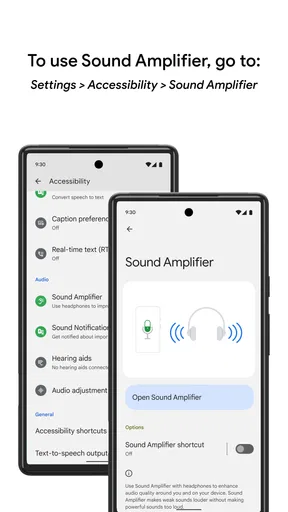
Downloading Sound Amplifier was a breeze. Available for both Android and iOS, you can grab it from the Google Play Store or the App Store. Once installed, the app greets you with a clean and simple interface, making it super easy to navigate, even if you're not a tech wizard. The setup is straightforward, and it integrates seamlessly with your device's audio settings.
Tuning into the Features
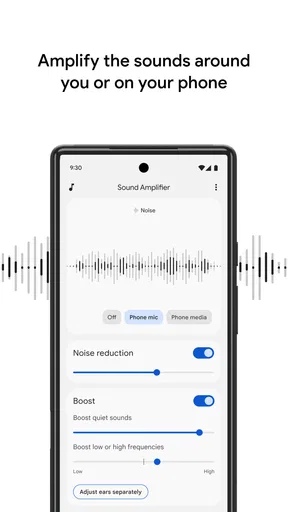
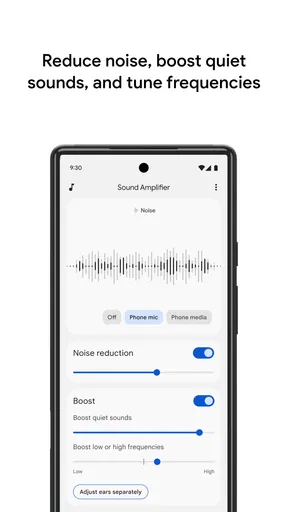
One of the first things I noticed is how customizable it is. You can tweak the amplification levels to your liking, whether you're in a bustling café or just chilling at home. The app uses your phone's microphone to amplify surrounding sounds, which you can then hear through your headphones. It's like having a personal sound engineer in your pocket!
The sound clarity is impressive. I tested it in various environments, from busy streets to quiet parks, and the app consistently delivered clear and crisp sound. The background noise reduction feature is particularly nifty, cutting through the clutter and enhancing the sounds you actually want to hear.
Worth Reading Before You Choose

Flipboard Shows What News Apps Must Do Beyond the Feed

Switching to Android Auto Means Rethinking Your Driving Routine

Google Calendar Makes a Crowded Week Easier to Manage

Ludo King Makes the Most of the Minutes Between Plans

Baby Panda World Brings Quick Play to Modern Phones, but Its Game Library Feels Busy

ESPN’s Live Game View Makes Following Close Games Easier
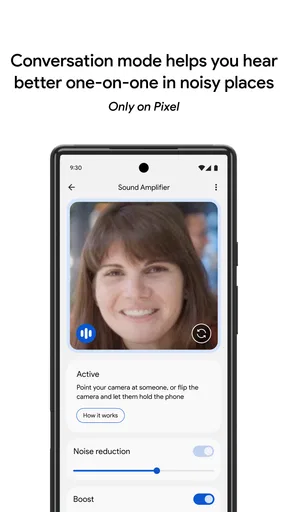
In everyday use, the microphone’s position can matter as much as the setting. If I’m trying to hear someone across a table, I’d place the phone where it can pick up that person’s voice rather than leave it buried in a bag or under papers. That small change can be more useful than simply raising amplification, because the phone is listening from its own location, not from where my ears are.
A good routine is to begin with a moderate level, then make a small adjustment after listening to a few sentences. I would also pause before moving the phone or changing environments, since a setting that feels comfortable in a quiet room may be too strong beside traffic or a busy kitchen. The goal is a natural, understandable sound, not maximum loudness.
For a quieter setting, such as listening to birds from a bench, this kind of amplification can make soft details easier to notice. In a crowded café, though, several voices and clattering dishes may compete at once. Noise filtering can help, but it cannot make every source disappear; choosing a seat away from the loudest activity and placing the phone nearer to the person speaking may do more than turning the controls all the way up.
Who Is It For?
If you have hearing issues or just want to boost your audio experience, this app is a game-changer. It's also perfect for those moments when you need to focus on specific sounds or voices. I found it especially useful during meetings in loud environments, where picking up every word is crucial.
I can also see it helping someone follow a quiet conversation at home, listen to a guide in a small group, or catch a family member speaking from across a table. A realistic routine might be to arrive early for a meeting, place the phone near the person leading it, connect the headphones, and make a quick comfort check before discussion begins. That is more dependable than trying to set everything up while people are already talking.
It is less suited to situations where carrying a phone and wearing headphones would be awkward, unsafe, or socially inconvenient. I would not use it while crossing a road or cycling, since listening more closely through headphones can make it harder to notice surrounding activity. For a conversation that moves around a room, a phone left in one place may also stop being a useful listening point.
Compared with simply turning up a television or choosing a louder audio track, Sound Amplifier focuses on nearby sound rather than the media’s own volume. Compared with asking someone to repeat a sentence, it offers a listening adjustment, but it does not replace clear communication or a quieter setting. If a person needs an ongoing, tailored solution for hearing, professional advice or purpose-built hearing equipment may be a better fit.
The app’s broad reach is reflected in its popularity: it has over 100 million installs and an average rating of 3.6 from around 91 thousand ratings. I read that as a sign that many people find a use for it, while the middling average is a reminder that results can vary with headphones, surroundings, and individual hearing needs. It is free and rated for Everyone, so trying it is relatively easy, but I would still judge it by a careful test in the situations where I actually need it.
Getting the Most Out of It
To make the most of Sound Amplifier, I recommend using high-quality headphones. The app works well with most types, but a good pair can make a significant difference in sound quality. Also, playing around with the settings to find your sweet spot is key. Don't be afraid to experiment!
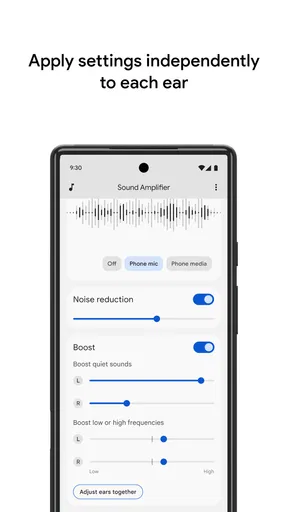
Another cool feature is the ability to adjust the left and right ear amplification independently. It's perfect for those who might have different hearing capabilities in each ear.
Independent ear adjustment is worth testing patiently rather than assuming both sides should be identical. I would change one side slightly, listen to familiar speech, and then decide whether the balance feels clearer. If the headphones fit unevenly or one earbud is not seated properly, that can affect what you hear too, so I’d check the physical fit before making a large compensation in the app.
Headphones are not interchangeable in practice. A comfortable pair that lets you hear the amplified sound clearly is more useful than an expensive pair that is inconvenient to wear or blocks too much awareness of your surroundings. For use outside the home, I’d keep situational awareness in mind and avoid listening at a level that masks nearby sounds. In a stationary, quiet setting, I can take more time to tune the sound without that same trade-off.
It is also sensible to think about battery use and handling before a long session. The app relies on the phone being available as a microphone and listening source, so I would start with a charged device and keep it somewhere stable and accessible. If the phone is moved, covered, or placed too far from the speaker, the listening experience can change even when the settings have not. A quick check after settling into a new seat can prevent confusion later.
If the sound suddenly feels uncomfortable, I’d lower the level first, then reposition the phone and check the headphones before making more adjustments. A brief pause can help distinguish an app setting issue from a poor microphone position or a noisy environment. For an important conversation, having the speaker face you and speak clearly remains useful; amplification works best as support for listening, not as a substitute for good communication.
Reliability and everyday limits
For a straightforward listening session, the simple controls make it easy to get started without a long setup process. Still, I would not assume that every phone, headphone combination, or room will feel identical. Perceived speed and clarity depend heavily on what the microphone can capture and how the listening device presents it. In a calm room with a nearby speaker, the task is easier than separating one voice from a jumble of sound.
If the experience seems to change, I’d first check the basics: is the microphone still pointed toward the sound I care about, are the headphones connected and sitting comfortably, and has the surrounding noise changed? Those checks are practical first steps before reopening settings or deciding the app has stopped working. Moving to a quieter spot can sometimes be the most effective adjustment available.
People also ask whether this is suitable for every conversation. I’d say it is most useful when I can control where the phone sits and remain in one place. It is less convenient when speakers move around, several people talk at once, or I need to keep my ears open to the environment. In those cases, asking for a quieter place or a repeat may work better.
Google LLC developed the app, and its communication purpose is narrow in a helpful way: it is for listening to nearby sound, rather than messaging or making calls. That focus keeps the use case clear, but it also means it should not be mistaken for a complete hearing-care solution. Anyone who finds that ordinary conversations remain difficult should consider getting individual guidance instead of relying only on an app.
Final Thoughts
Overall, I was quite impressed with Sound Amplifier. It's a handy app that caters to a wide range of users, from those with hearing difficulties to anyone looking to enhance their auditory experience. The app is user-friendly, efficient, and does exactly what it promises. Whether you're trying to catch every note of a concert or just want to hear the world a little clearer, this app has got your back.
So, why not give it a try? Dive into the world of amplified sound and see how it can transform your daily life. Trust me, once you start using it, you'll wonder how you ever got by without it!
My performance verdict is positive when expectations are realistic: this is a convenient way to adjust how nearby sound reaches headphones, especially when I can place the phone thoughtfully and fine-tune the balance. It is not a magic fix for distance, heavy background noise, or every kind of hearing difficulty. I’d recommend trying it in a familiar, safe setting first, then keeping it for the moments when that extra listening control genuinely helps.
Pros
- Easy to use with intuitive controls.
- Enhances audio clarity effectively.
- Works seamlessly with other apps.
- Customizable sound settings.
- Supports both wired and wireless headphones.
Cons
- Limited support for non-standard devices.
- May drain battery faster.
- Occasional lag in sound processing.
- Not all languages supported.
- Requires Android 6.0 or higher.
FAQs for Sound Amplifier
What is Sound Amplifier and how does it work?
Sound Amplifier is an accessibility app designed to enhance audio for those with hearing difficulties. It works by increasing the volume and clarity of sounds from your environment or media, allowing you to adjust settings for noise reduction and speech enhancement. The app uses your device’s microphone to capture and process sound, delivering a clearer listening experience.
Is Sound Amplifier compatible with all Android and iOS devices?
Sound Amplifier is compatible with most Android devices running Android 6.0 (Marshmallow) and later. However, its availability on iOS is limited, and similar functionalities may be found in other apps. It’s important to check the app’s current device requirements and compatibility in the Google Play Store before downloading.
Does Sound Amplifier require an internet connection to function?
No, Sound Amplifier does not require an internet connection to function. It processes sound using your device's built-in hardware, allowing you to use the app anywhere without relying on Wi-Fi or cellular data. This makes it ideal for situations where internet access is limited or unavailable.
Can Sound Amplifier be used with headphones or hearing aids?
Yes, Sound Amplifier is designed to work effectively with wired or Bluetooth headphones and hearing aids. By using headphones, users can enjoy a more personalized and direct sound enhancement experience. It’s recommended to use high-quality headphones for the best performance and sound clarity.
Is Sound Amplifier easy to set up and use for beginners?
Sound Amplifier is user-friendly with a straightforward setup process. Upon installation, users are guided through easy-to-follow steps to customize their sound preferences. The interface is intuitive, featuring sliders for volume and noise reduction adjustments, making it accessible even for those who are not tech-savvy.


